After update of NVidia Studio Driver the use of my outdated GPU was improved by same degree,
but nothing earthshaking, while everything was and is working.
If it hasn’t been done already, I suggest making sure that all drivers and uefi firmware provided by Alienware are up-to-date.
I think DXO needs to improve their caching of images. I noticed especially in the Photo Library it takes forever to load the images the first time when you go into a folder. And if you change the preview image size in the Photo Library, it has to re-cache all of the preview images again. I think the older versions of Photo Lab had better caching performance compared to the newer versions. For me it’s not as bad when editing and going from photo to photo. I have a newer Dell desktop also. And my images files are not that big either. They are from an old 12MP Nikon and a newer 20MP Olympus. But it’s really slow going into a folder for the first time. You have to scroll down and let the images slowly load. Then scroll down further and let more images load. Once it’s cached, it’s fine. The reason why I believe it’s an issue with the caching is that Lightroom and Capture One will create cache preview images the first time you import them in to the system. So you pay for the slowness the very first time you import. Also if you look at the cache directory size in those other two software, they are much larger than that of DXO. Those other software have no cache space limit and will continue to grow when you add more photos into them.
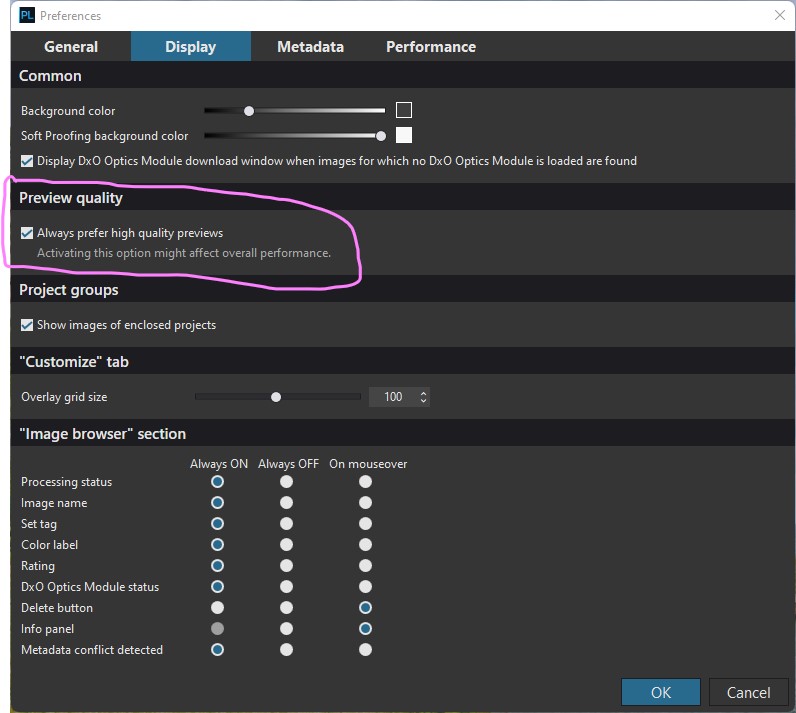
I have a desktop PC running Windows 11 Pro: 10th Generation i7-10700F CPU 2.90GHz processor; 32GB Ram and a NVIDIA GeForce GTX 1660 Super graphics card and PL6 is installed on a SSD. The best thing I did to improve user experience, was to enable ‘Always prefer high quality previews’. This setting eliminates the lag when adjustments are made to images in Customize.
As other posters have stated, when you open a folder of images it takes a while to render all the images. In Customize, if I switch to another image, it takes around 2 second to render, but this is I believe down to the application of the DxO Standard default.
I have also updated the drivers on my NVIDIA GeForce GTX 1660 Super, to Studio Driver 527.56, which also appear to be the latest for the RTX 3080.
I have to say though, as a long time user of DxO Photolab and before that Optics Pro: PL6 feels slower and less responsive than previous versions. Lightroom Classic and Affinity Photo 2 by comparison, feel positively snappy on my machine!
That is perfectly normal for a RAW file. What you initially see is the embedded JPEG rendering; then, once the RAW data has been processed and cached, you see the default rendering you’ve set up for RAW images. If you switch back and forth between two images, you will no longer see the two-second delay because the images are now cached. (This can take a few tries sometimes, but it shows what’s going on.)
For what it’s worth, I think PhotoLab has been improving how well it multitasks while these images are being loaded and previewed. I don’t know if it’s any faster than it used to be, though. Maybe a little?
I agree - especially after PL6 has been running for a day and has processed a number of images or when one has used a variety of adjustments on a single image (local adjustments, ReShape, healing and cloning…). It’s brutally slow at times, and then it’s fine again for only a little while.
I have been a user since purchasing PL1 in November 2017. I have an almost 6 year old i7 Windows 10 machine which was not top of the line even when purchased new. I have 24gb of ram and an old discontinued GTX 1050Ti graphics card. I find PL6.1.1 to be very responsive, very snappy. It hard to make direct comparisons to older versions which are not currently installed, but, if anything, the latest version is at least as fast and in several ways much faster then previous versions.
As an example, Image refreshes changing from one extremely heavily edited image to another generally take approximately two to three seconds to completely refresh, even when zoomed in past 75%. Less heavily edited images take between one and two seconds to refresh and unedited images take from less than a second to a second and a half. This is on an older, slower computer. I distinctly recall that in previous versions, prior to PL 5, similar refreshes took at least twice as long on a regular basis.
Results from moving all sliders are instantaneous. My DeepPRIME and DeepPRIME XD exports process very quickly considering my older computer and my old and less powerful graphics card. DeepPRIME averages 14 seconds and DeepPRIME XD averages 34 seconds. I have noticed a steady improvement in DeepPRIME processing time in each version since it was first introduced. The only thing that has gotten a bit slower then PL5 is startup time. It took around 9-10 seconds for PL 5 to complete its start up on my computer. PL6.1.1 takes around 10-12 seconds, an inconsequential difference.
In what specific ways do you see the latest version as being slower? Maybe something needs to be optimized on Windows 11.
Mark. .
1 Like
Mark,
Whilst PL6 is most definitely usable, I would not describe it as either very responsive or very snappy. The machine I am now using is fairly new, arriving with Windows 11 Pro preloaded, so you may well be right about some settings needing optimising.
Pat
Hi,
Did you ever find out what caused the delay? I have the same problem. Coming from C1 and editing GFX100 files. It takes many second each time I change to a new files to generate full preview. On C1 it is instant. It doesn’t help if I have looked at the file previously. Same slow delay for each file I go into.
I use PL8.
Have 12th Gen Intel(R) Core™ i7-12700H 2.30 GHz proccessor
64GB RAM
SSD hard drive
Capture One is super fast.
You don’t say what graphics card you have? I have a 4 year old machine - i5 3.4ghz, 32 gig ram, ssd and gtx 1660 super - ie far from powerful - and full picture rendering is typically sub-second in PL8. Much snappier than eg On1 photo raw which takes 2-3 seconds.
It would be interesting to know the cause of the problem. Are your graphics drivers up to date?
Graphics card: NVIDIA GeForce RTX 3050 Laptop
It switch instantly on Capture One 23.
I tried files from the GFX50R, it is also slow, but fast om C1.
It is the time for the full preview that takes some seconds

Tested with my Fujifilm X100V1 files also, still take 4-5 seconds for full preview to be created. Those files are not very demanding.
Interesting, that card benchmarks almost identically to mine. I’ve double checked by looking at some pics I’ve never viewed in PL before, and I still get sub second rendering ie the length of time that ‘… Full preview in progress…’ is displayed. Sorry, no idea why yours should be so slow
Graphics cards don’t really factor into editing performance. Exporting performance is a different story.
Anyway Photolab has som deficiencies with respect to caching of images and available previews. It’s not hard to imagine PL recomputing what the next frame will look like before you switch to it so that it can be displayed instantly but this basically doesn’t happen. There is some caching and sometimes the display can be fairly quick but it’s inconsistent and never instant.
Even if I switch to the next image, wait for it to render and switch back to the image that was just on my screen, the cache doesn’t work and the image has to be re-rendered. It makes no sense but here we are.
1 Like
Did we get any resolution in this?
I’ve just updated to the latest version of Photolab 8 (8.2.1) and am also finding that switching back and forth between the same photos results in slow down and “Full preview in progress…” delays.
It’s either regenerating the previews from scratch - every time - or the cache load is SLOW.