No worries, Vichenso - Here goes …
In PL’s preference settings (Menu: Edit / Preferences) there’s a setting that determines the Preset that’s applied to all newly encountered image.
Here’s mine: 
Yours probably still refers to the DxO Standard preset - which is the “out of the box” setting.
You are able to modify the DxO Standard and then save it as your personal default (instead of Standard).
-
Point PL at an image that it has never encountered before (to ensure the DxO Standard preset will be applied, with no other modifications).
-
Make any changes to settings that you’d like to become your own default - - for example, open the crop tool and change the aspect ratio, etc, etc, etc
-
Use this menu option:
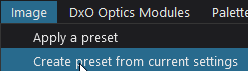 … and save current settings with your preset name.
 -
Go to the Preferences settings (as above) and change ‘DxO Standard’ to your default preset name.
– For RGB images, it’s best to set the default to ‘5 - No Correction’ - to avoid doubling-up.
HtH - John M